Introduction
There's a tension that every leader of a growing company feels right now: employees want flexibility, but the office still needs to earn the commute. That pressure lands directly on how the space is designed.
According to Gallup, 52% of U.S. remote-capable employees currently work hybrid—and CBRE reports that 80% of office occupiers have adopted hybrid policies and plan to keep them. Hybrid isn't a phase. It's the operating model.
The problem is that most offices weren't designed for it. They were built around full daily occupancy, assigned desks, and the assumption that everyone would be in the building at the same time. Adding a few video screens doesn't fix that mismatch.
This guide covers the practical framework for designing a hybrid office that actually works: the audit phase most companies skip, zone planning, layout, acoustics, technology, and buildout execution—with a focus on what that looks like in competitive markets like New York City.
Key Takeaways
- Hybrid office design isn't about fewer desks—it's about purposeful space that earns employee attendance.
- Run a usage audit before committing to any layout or lease size.
- Every hybrid office needs at least four distinct zones: collaboration, focus, social, and hybrid meeting.
- Acoustic treatment and equitable AV technology are non-negotiables, not optional upgrades.
- Buildout planning should begin alongside lease negotiation, not as an afterthought once the ink is dry.
What Is Hybrid Office Design?
Hybrid office design is the intentional configuration of physical space to support employees who split time between the office and remote work. Unlike agile design — which creates flexible spaces without accounting for the home-to-office divide — or traditional design built for full daily occupancy, hybrid design operates from a different premise: the office has to earn the commute.
Companies that treat hybrid design as a cosmetic update end up with expensive space employees actively avoid. The office needs to offer what remote work cannot: the kind of unplanned conversations that don't happen over Slack, better collaboration infrastructure, mentorship access, and genuine social connection.
The Three Hybrid Models (and Why They Produce Different Spaces)
Your hybrid model determines your space requirements :
- Office-first (employees primarily in-office, occasional remote): Closer to traditional design, but still needs quiet zones and hybrid-capable meeting rooms
- Balanced hybrid (2–3 days in-office, rest remote): The most common model, requiring the broadest mix of zone types and flexible seating strategies
- Remote-first (occasional in-office days): Leans heavily toward collaboration and social zones, with minimal assigned seating
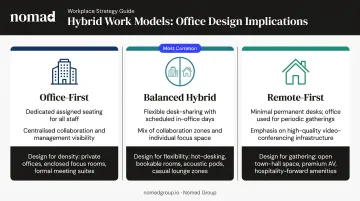
Each model creates different attendance patterns, different peak-day pressures, and different space utilization realities. The design has to reflect which model your team actually operates under—not which one the policy document describes.
Before You Design, Understand How Your Team Actually Works
Skipping the audit phase is the most common and costly hybrid design mistake. Decisions about desk ratios, zone allocation, and room types made without real attendance data consistently produce the wrong kind of space in the wrong proportions.
JLL's occupancy benchmark data shows global office utilization at 56% against targets of 74%—an 18-percentage-point gap. That gap exists largely because organizations are sizing and configuring space based on assumptions, not evidence.
What a Hybrid Audit Actually Covers
A proper usage audit involves three components:
- Survey your team on which days they plan to come in, which tasks bring them in, and what they need from the office that home can't provide
- Map work modes by identifying which activities are best done in person (collaborative workshops, onboarding, client meetings, mentoring) versus remotely (deep focus, solo drafting, routine calls)
- Identify your peak days and plan capacity around them—not around averages
On the question of what draws people in: Gensler's U.S. Work From Home Survey found that three out of four employees said "the people" were what they missed most about the office. That's the benchmark for what in-person time should be designed around: human connection, not heads-down work.
Translating Audit Data Into Seating Ratios
For balanced hybrid companies, most operate with peak-day occupancy well below full headcount—which means desk-to-headcount ratios can be reduced without creating a shortage. The freed-up square footage shouldn't be eliminated; it should be reallocated to collaboration and social zones.
For companies still uncertain about their long-term hybrid cadence, flexible lease structures reduce the risk of committing to the wrong footprint. Nomad Group's Flex by Nomad service addresses this directly—it's built for high-growth companies that need space flexibility woven into their lease terms, with the infrastructure to support it.
The Essential Zones Every Hybrid Office Needs
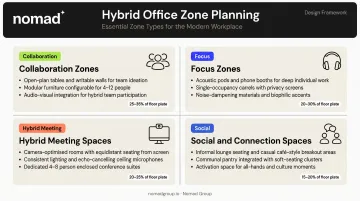
A well-designed hybrid office organizes space around how people actually work — not where they sit. Most offices need four distinct zone types, sized according to how your team actually uses the space.
Collaboration Zones
Collaboration zones are for group work, brainstorming, and creative sessions. They should feature:
- Writable surfaces and modular furniture that reconfigures quickly
- Screens for content sharing
- A mix of large team rooms (6–12 people) and smaller huddle spaces (2–4 people)
Most offices underinvest in the smaller end. Gensler's 2025 Global Workplace Survey—covering nearly 17,000 office workers across 15 countries—found that flexible co-creation spaces ranked in the top three for six of seven in-person work activity types, while traditional conference rooms ranked top three for only four. The implication: you need more varied spaces, not more large rooms.
Focus Zones
Open offices failed because they eliminated the ability to do deep, uninterrupted work. Every hybrid office needs:
- Private phone booths for calls
- Focus pods or designated quiet areas
- Acoustic treatment throughout
For many employees, reliable access to quiet space is the primary reason to come in at all. Gensler reports 65% of employees prefer a combination of open areas and private spaces — and offices that offer both see stronger in-office attendance.
Hybrid Meeting Spaces
A meeting room that only works for in-person participants is just a traditional conference room. True hybrid meeting rooms require:
- Cameras positioned at eye level (not mounted to the ceiling)
- Displays showing remote participants at near life-size
- Directional microphones with proper placement
- Acoustic treatment to prevent sound bleed
Cisco's research found 76% of employees don't feel current meeting rooms enhance productivity, with insufficient audio and video as the primary reason. Most companies also have too many large conference rooms and too few 4-person hybrid-capable rooms — a mismatch worth addressing before investing in AV upgrades.
Social and Connection Spaces
Informal social zones—lounges, coffee bars, casual seating—build the culture that Slack cannot replicate. The concept of "weak ties" (loose cross-team acquaintances that spark unexpected ideas and opportunities) depends on physical proximity and chance encounters.
Design tactics that generate those encounters:
- Centralized social hubs rather than department-by-department kitchen points
- Bar seating for standing conversations
- Comfortable lounge seating for longer discussions
- Routes that draw different teams through the same spaces
Flexibility by Design: Layout, Furniture, and Acoustics
Hybrid work patterns will keep evolving. The spaces built today need to adapt without wall demolition or major reconstruction—which means the flexibility has to be designed in from day one.
Furniture and Layout Principles
Favor:
- Modular furniture systems that reconfigure without contractor involvement
- Movable panels and partitions
- Pods or booths with casters rather than permanently constructed enclosures
JLL notes that more organizations are shifting toward modular office furniture specifically because it allows spaces to evolve as team needs change—without triggering a new buildout each time.
Acoustic Design
Acoustic management is one of the most underinvested elements in hybrid office design, and one of the most impactful. Noise bleeding from open areas into focus zones—or poor sound absorption in meeting rooms—consistently ranks among employees' top complaints about in-office work.
Research cited by the International WELL Building Institute found employees in WELL-certified offices were 17% more satisfied with acoustical privacy than those in non-certified environments. That's a measurable performance input, not a finish-level preference.
Practical solutions:
- Sound masking systems in open areas
- Acoustic panels and screens between zones
- Material choices that absorb rather than amplify (carpet, soft seating, fabric wall treatments)
- Clear spatial separation between quiet and active zones
Hot Desking vs. Team Neighborhoods
Pure hot desking—where everyone competes for any available seat—creates a feeling of impermanence that erodes belonging. Gensler's 2024 Workplace Survey found 87% of employees with assigned seating feel a sense of belonging, compared to a 13-percentage-point drop in unassigned environments.
Team neighborhoods solve this: they give people a home base within the office without locking them to an individual desk. Support that with:
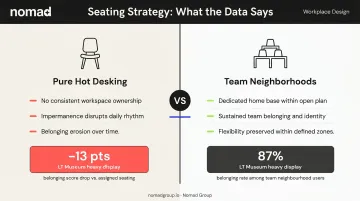
- Personal lockers or team shelving so employees aren't hauling everything in daily
- Consistent zone placement so teams know where to find each other
- Shared surfaces for collaboration within the neighborhood
Technology That Keeps In-Person and Remote Teams Equal
The foundational principle for hybrid office technology: every setup should give remote participants equal presence, not just technical access. Poor audio, back-of-room cameras, and content only visible to people in the room create a systematic disadvantage for distributed team members.
Core Technology Requirements
| Component | Purpose |
|---|---|
| Standardized video conferencing hardware | Consistent quality across all meeting rooms |
| Eye-level cameras and directional microphones | Equal presence for remote participants |
| Digital whiteboarding tools | Real-time co-editing across locations |
| Room scheduling and desk booking software | Prevents overcrowding, gives employees confidence space will be available |
| High-speed Wi-Fi throughout all zones | Reliable connectivity, especially in focus and social areas |
Desk booking software has an outsized impact on office attendance. Employees who arrive to find no available desk or a booked-up room will stop commuting. Booking tools remove that friction — and give the organization real utilization data in return.
Standardization Over Improvisation
Technology rollout needs to be consistent across rooms, not improvised based on whatever was in the budget that quarter. Inconsistent setups force employees to "shop" for functional rooms before every meeting, adding friction and reducing office usage.
Microsoft's Teams Rooms documentation specifies that hybrid room setups require camera, microphone, speaker, display, and content-sharing capabilities working together — not a partial combination of these elements.
From Design Decisions to Buildout: What to Expect
Most companies treat design and buildout as sequential phases—finalize every decision, then hand it off for construction. That sequence adds months and creates expensive rework. Buildout planning should begin alongside lease negotiation and design, not after.
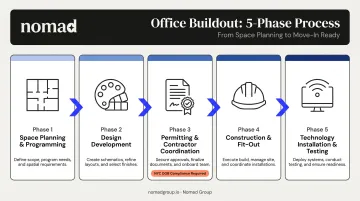
The Typical Hybrid Office Buildout Phases
- Space planning and programming — Translating the work mode audit into a floor plan
- Design development — Selecting materials, furniture, AV specs, acoustic treatments
- Permitting and contractor coordination — In NYC, this means a licensed Professional Engineer or Registered Architect must file plans and serve as Applicant of Record for all commercial alterations per NYC DOB requirements
- Construction and fit-out — The physical build
- Technology installation and testing — AV, Wi-Fi, booking systems, and verification before move-in
Timeline Expectations
A well-managed hybrid office buildout in NYC typically runs 3–6 months from lease signing to move-in, with design and permitting phases often taking as long as the construction itself. Companies that start buildout planning during lease negotiation—not after—compress the overall timeline meaningfully.
Nomad Group's track record of 300+ tenant buildouts completed with a 90-day turnaround comes down to exactly that: design, permitting, and contractor coordination running concurrently rather than sequentially.
Phase It, Don't Over-Commit
Rather than redesigning an entire floor at once, build out one representative zone first, gather real employee feedback, then scale the proven approach. Doing so:
- Reduces risk if the initial design assumptions were wrong
- Controls cost by catching problems early
- Builds internal buy-in before the full investment is made
Building Flexibility Into Day One
For startups and Series A companies uncertain about 18-month headcount, the buildout strategy itself needs flexibility:
- Infrastructure rough-ins for future rooms
- Modular partition systems that don't require contractor involvement to reconfigure
- Furniture systems that adapt as the team grows
Frequently Asked Questions
How much office space does a hybrid company need per person?
JLL's 2025 benchmarks put average space per person around 165 rentable square feet for hybrid offices. That number shifts based on your peak-day attendance patterns—and any freed-up desk space should be redirected to collaboration zones, not used to shrink the total footprint.
Should a hybrid company downsize its office when going hybrid?
Downsizing isn't automatic. Many companies reduce desk count while retaining existing square footage to invest it in better zone types. The right decision depends on peak attendance days—not average occupancy—and requires a usage audit before any lease decision is made.
What's the difference between hot desking and activity-based working?
Hot desking is simply unassigned seating. Activity-based working (ABW) is a full zoning strategy where different areas are designed for specific work modes. ABW is more effective in hybrid offices because it gives employees a clear reason to move purposefully through the space, rather than hunting for any open seat.
How do you prevent hybrid office design from making remote employees feel excluded?
Equip every meeting room with eye-level cameras, directional microphones, and displays that give remote participants equal visual presence—and back it up with digital collaboration tools that keep work accessible from anywhere. Meeting culture alone won't fix a poor AV configuration.
How long does it take to design and build out a hybrid office?
For a mid-sized office, the full timeline from lease signing to move-in typically runs 3–6 months—with design and permitting often taking as long as construction itself. Starting buildout planning during lease negotiation, not after, can cut weeks off that schedule.
What are the most common hybrid office design mistakes?
The top three: (1) designing before auditing actual usage patterns, (2) underinvesting in acoustic treatment and hybrid meeting technology, and (3) building too many large conference rooms instead of small, flexible collaboration spaces and focus areas.